
A roller shutter door not closing can interrupt dispatch, leave stock exposed, and delay the end of a shift. For a warehouse or facility manager, the first task is to identify how the door fails: does it refuse to move, stop halfway down, reverse, or leave a gap at the floor?
An aluminum shutter may stop closing because an obstruction blocks its travel, a safety device prevents movement, the curtain binds in its guides, or the controls cannot complete the closing cycle. The symptom alone does not prove that the motor needs replacement. Several faults can produce similar behavior.
This guide explains what to observe, which checks trained operators can make without dismantling equipment, and what information a door technician needs. It focuses on commercial and industrial aluminum roller shutter doors. Motor arrangements, safety devices, and emergency operation differ between installations, so use the instructions for your actual door and controller when deciding the next step.
Contents
- 1 Roller Shutter Door Not Closing? Identify the Symptom First
- 2 Checks Before Troubleshooting
- 3 Why Your Aluminum Roller Shutter Door Is Not Closing
- 3.1 1. An obstruction blocks the opening or the bottom rail
- 3.2 2. A photocell cannot confirm a clear opening
- 3.3 3. A safety edge detects contact or reports a fault
- 3.4 4. The curtain binds in the side guides
- 3.5 5. The closing position or position feedback needs attention
- 3.6 6. The closing command is not reaching the drive correctly
- 3.7 7. The motor, drive, or protective system has stopped operation
- 4 What You Can Check and When to Call a Technician
- 5 Maintenance to Help Prevent Closing Problems
- 6 Frequently Asked Questions
- 6.1 Why does my aluminum roller shutter open but not close?
- 6.2 Why does the shutter reverse before reaching the floor?
- 6.3 Why does the door stop halfway down?
- 6.4 Why is there a gap beneath the shutter when it stops?
- 6.5 Can I close an electric roller shutter manually?
- 6.6 Should I replace the motor if the shutter will not close?
- 6.7 Will resetting the controller solve the problem?
- 7 Get Help With Your Shutter’s Closing Problem
Roller Shutter Door Not Closing? Identify the Symptom First
Describe what happened during the last normal operating attempt. Avoid running repeated cycles just to collect evidence. A useful observation is specific: “the curtain stops level, about a handspan above the floor” tells a technician more than “the shutter is broken.”
Use the table as a starting point, not a confirmed diagnosis. More than one condition can apply, and a controller may deliberately stop movement when it detects a problem elsewhere.
| Observed symptom | Possible areas to investigate | Useful next step |
|---|---|---|
| No downward movement. | Control input, operating mode, safety circuit, power supply, or drive fault. | Record the controller display and which normal controls respond. |
| Starts down, then reverses. | Obstacle detection, safety edge, photocell, mechanical resistance, or closing-position setup. | Record the reversal location and look for visible obstructions from outside the travel area. |
| Stops partway down. | Guide restriction, displaced slat, control interruption, or drive protection. | Record whether the curtain remains level and whether scraping or distortion is visible. |
| Stops level above the floor. | Closing limit, position feedback, threshold changes, or bottom-seal interference. | Photograph the gap and report any recent service or floor work. |
| Closes unevenly or tilts. | Curtain, guides, attachments, or supporting components. | Stop operation and arrange a qualified mechanical inspection. |
| Wall control works but the remote does not. | Remote battery, transmitter, receiver, permissions, or control configuration. | Identify the remote and controller models; follow their operator instructions. |
Also establish when the problem began. A fault immediately after a vehicle impact calls for a different investigation from a fault after a power interruption. A problem following a new floor finish may involve the threshold or closing position. Record that history before anyone changes settings.
Distinguish a manual shutter from an electrically operated shutter
The aluminum curtain describes the door material, not the operating system. A manual shutter has no electrical closing command to diagnose. An electrically operated shutter may use wall buttons, a key switch, a remote, or an access-control input. Identify the installed arrangement before following a troubleshooting checklist.
If a manual door suddenly requires more force, jams, or travels unevenly, stop using it. Do not treat extra effort as a substitute for inspection. For a motorized door, note whether both directions fail or only closing fails; this helps a technician narrow the investigation without assuming a single cause.
Checks Before Troubleshooting
Keep people, vehicles, and stored goods away from the doorway. Prevent another operator or an automatic activation system from starting the shutter while someone examines the opening. Follow your site’s isolation procedure before cleaning or touching components; pressing a stop button alone is not a substitute for electrical isolation.
Never walk beneath a stalled curtain to inspect it. Do not pull on the bottom rail, push slats back into their guides, loosen support brackets, or reach into the hood. Even with power isolated, mechanical parts may retain stored energy and an unsupported curtain can move.
Stop troubleshooting and contact a qualified door technician if you see a tilted curtain, loose guides, displaced slats, damaged supports, exposed wiring, smoke, or evidence of an impact. Keep the opening out of use until the condition has been assessed. A door that still moves may nevertheless have structural damage.
Collect identification before changing anything
Locate the door identification label, motor model, controller model, and installation or service record where these are safely accessible. Photograph external labels without opening electrical covers or climbing near the barrel. The same-looking shutter may use a different motor or control system from the door beside it.
Write down any displayed code exactly, including letters, numbers, and flashing patterns visible on the normal operator interface. Do not borrow a code definition from an unrelated brand. A supplier can use the model and manual version to interpret the display correctly.
Check operating mode without bypassing protection
Some shutters use a hold-to-run control: releasing the button stops travel by design. Other installations allow an automatic closing cycle. Confirm the intended mode in the operator instructions before treating every stop as a fault. Do not change modes or hold buttons as a workaround for a reported safety-device error.
For example, the UK Roller Shutters operating and maintenance manual describes different operating arrangements and model-dependent emergency procedures. This illustrates why instructions for the installed equipment take priority over a generic reset sequence.
Why Your Aluminum Roller Shutter Door Is Not Closing
1. An obstruction blocks the opening or the bottom rail
Packaging, pallet wrap, a displaced mat, or debris near the threshold can interfere with closing. An obstacle may physically stop the bottom rail or interrupt a protective sensor before the curtain reaches it. Look along the opening from a safe position rather than checking only its center.
Check whether temporary storage has encroached on the doorway. A carton beside a guide may look clear of the curtain but still obstruct a photoelectric beam. Materials that move in air currents can also make a problem appear intermittent.
Trained staff may remove loose, accessible items only when the door is safely secured against movement and the work does not require entering beneath an unsafe curtain. If an object is trapped in the guide or under the curtain, leave it for the technician. Do not pull it free while someone operates the controls.
After the obstruction is removed, follow the manufacturer’s return-to-service procedure. A single successful closing cycle does not explain a recurring problem. If the same item or material keeps entering the opening, change the storage or housekeeping arrangement as well.
2. A photocell cannot confirm a clear opening
Where fitted, a photoelectric safety device monitors a path across the opening. A blocked beam, contaminated lens, disturbed bracket, damaged cable, or device fault can prevent normal closing. The exact response depends on the controller and how the safety system was commissioned.
A roller shutter door sensor should not be diagnosed by its indicator color alone. Different devices use different indications. Record what you can see and compare it with the correct manual. Do not move the sensor until a light changes and assume the system is safe.
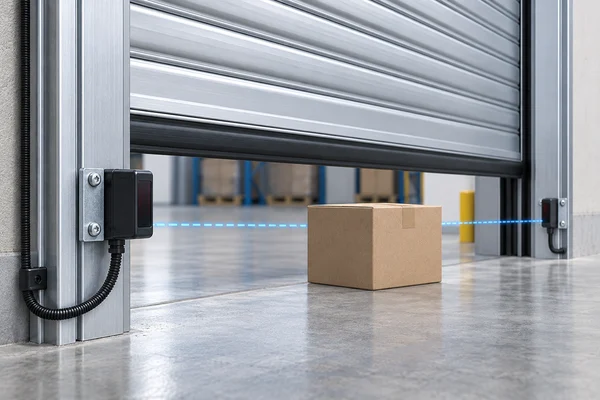
If the manufacturer permits operator cleaning, follow its method for accessible external lenses after securing the equipment. Use the specified cleaning materials and avoid disturbing alignment. Loose mounting hardware, damaged wiring, or a continuing fault requires qualified inspection.
Never bridge sensor terminals or disconnect protection to force the shutter down. The Kollias FBM-10.2 control-unit manual describes photocell and safety-edge responses for that particular controller. It is a useful example of why safety behavior and fault handling must be checked against a specific model, not generalized across brands.
3. A safety edge detects contact or reports a fault
Some shutters have a sensitive edge on the bottom rail. Depending on the system, contact during closing can stop or reverse the curtain. A damaged edge, connection problem, or monitored-device fault may also inhibit automatic movement even when no obstacle is visible.
From outside the danger area, look for obvious damage to the lower edge and for objects beneath it. A split or displaced rubber section, a loose external cable, or recent impact is useful information for the technician. Do not remove the profile or squeeze it during an operating cycle.
Not every rubber bottom seal is a safety edge. A plain weather seal and a monitored protective device can look similar. Identify the installed component through the documentation before assuming the shutter has obstacle detection at that location.
Replacing a safety edge involves compatibility and functional checks, not just matching its length. Ask the supplier to confirm the device, controller interface, and required commissioning procedure. Keep the door out of automatic service when its protective function is uncertain.
4. The curtain binds in the side guides
The curtain must travel through both guides without a local restriction. A bent guide, displaced slat, damaged end fitting, or accumulated material may prevent smooth descent. Scraping, uneven movement, or a stop near visible damage points toward a mechanical inspection.
Inspect only what you can see safely from outside the opening. Compare the left and right sides, looking for fresh marks, bent metal, loose visible fixings, or a slat that no longer sits in line with the others. Photographs of both guides are more useful than a close-up of one side alone.
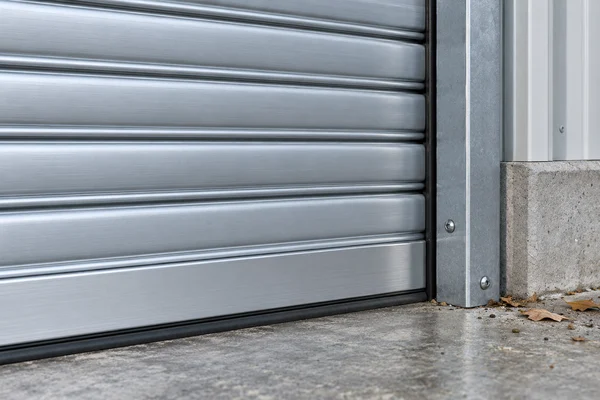
Do not hammer a guide straight, force a slat into place, or loosen guide anchors to gain clearance. Those actions can alter curtain retention and hide the cause of the problem. A technician needs to assess alignment, curtain condition, and attachment integrity together.
Lubrication is not a universal cure for binding. Follow the manufacturer’s instructions for the actual guide, seals, and moving parts. Adding oil or grease to an unspecified location can contaminate materials and collect dirt without correcting distortion.
5. The closing position or position feedback needs attention
A level curtain that stops short of the floor may have a closing-position issue. Depending on the operator, the system may use mechanical limit switches, electronic limits, or position feedback. Threshold changes and bottom-seal interference can create similar symptoms, so the gap alone does not identify the cause.
Record whether the gap is uniform across the opening and whether the door stops at the same height. Tell the technician about recent motor replacement, controller work, floor resurfacing, or changes to the bottom rail. If the fault began after service, retain the service report.
The correct response to a roller shutter door limit switch problem depends on the equipment. Do not turn adjustment screws or copy a programming sequence from a video for another operator. An incorrect setting can cause overtravel, curtain compression, or damage at the end of travel.
A qualified technician should first rule out mechanical restrictions, then check the position system and verify normal travel and protective functions. Increasing force or extending travel to overcome a restriction treats the symptom while leaving the underlying fault.
6. The closing command is not reaching the drive correctly
A remote-control problem, wall-station fault, selected operating mode, active interlock, or controller issue can interrupt the closing command. If opening works but closing does not, the available power does not by itself prove that the control circuit and safety inputs are healthy.
Record which controls worked during the last safe attempt. If a wall station operates normally but a remote does not, investigate the remote and receiver according to their instructions. If neither normal control works, provide that information instead of repeatedly pairing transmitters or resetting the controller.
Do not reset an emergency stop until the reason for its activation has been identified and the area is safe. Do not defeat a door interlock to obtain movement. The device may be preventing operation because another part of the installation is not in the required state.
Our overview of electric roller shutter door controls and configuration explains the range of operating arrangements available. For troubleshooting, use the configuration supplied with your particular installation rather than assuming all motorized shutters behave alike.
7. The motor, drive, or protective system has stopped operation
A motor or drive fault can prevent closing, but it should not be the first conclusion. Mechanical resistance, electrical supply problems, control faults, or an activated protective function may produce similar symptoms. Some operators include thermal protection; its behavior and recovery procedure vary by model.
Report whether the fault followed unusually frequent operation, whether a normal external display shows an error, and whether anyone noticed unusual noise or an odor. Do not touch the motor to estimate its temperature, remove its cover, or keep cycling the door to see whether it recovers.
If the manufacturer describes a cooling period, follow that instruction. Do not invent a standard waiting time or assume recovery means the underlying problem has disappeared. A recurring stop requires investigation of duty, load, mechanical condition, and the electrical system by competent personnel.
Some installations also have anti-fall or brake protection. A suspected activation requires the procedure for that specific system and qualified assessment. Never release a brake or disengage a stalled curtain merely to get the entrance closed.
What You Can Check and When to Call a Technician
Base the division of work on training, the equipment instructions, and site procedures. A person responsible for daily operation may be able to report symptoms and remove loose items from a secured area. That does not qualify them to adjust limits, open a control panel, or work on the curtain supports.
Checks for trained operators
- Identify the door, controller, and normal operating method.
- Keep the doorway clear and prevent unintended operation.
- Record the stopping position, direction of movement, and visible display information.
- Look for loose objects, external contamination, or obvious damage from a safe position.
- Carry out only the accessible cleaning and routine checks permitted by the equipment instructions.
For example, staff may notice that a temporary packaging stack now crosses the photocell path. The useful action is to secure the area, remove that storage obstruction safely, and follow the documented restart procedure. Opening the controller and modifying the safety circuit would go beyond that task.
Work for qualified door and electrical personnel
Arrange professional inspection for damaged or displaced slats, guide misalignment, repeated reversing, unexplained position changes, electrical faults, and suspected brake or support problems. Electrical isolation, stored-energy control, and suitable access equipment require a planned method of work.
When requesting industrial roller shutter door repairs, ask the technician to identify the cause and the checks required before returning the entrance to use. The repair should address normal operation and any affected protective functions. Closing the door once is not sufficient evidence that every relevant function works.
If the shutter cannot close at the end of the shift, agree on temporary site security and access arrangements with the facility manager. Do not use vehicles, makeshift supports, or improvised restraints to force or hold the curtain. Keep required access and escape arrangements available while the fault is managed.
A useful fault report
Prepare a short record before contacting the supplier. Include the installation reference, door and controller models, approximate opening dimensions, fault description, and any recent event. State whether the problem appeared suddenly or developed over several days.
Add a front view of the complete opening, safe external views of both guides and the bottom rail, and a clear picture of the controller display. A video of an existing fault can help if it is already available. Do not operate a damaged door or enter its travel zone to create one.
Consider this example report: “The curtain remains level and stops above the floor. The problem began after floor repairs. There is no visible impact damage, and the controller shows the attached indication.” This gives the technician a useful starting point without presenting a guessed diagnosis as fact.
Maintenance to Help Prevent Closing Problems
Practical roller shutter door maintenance starts with the operating environment. Keep packaging, loose straps, dirt, and temporary equipment away from the threshold and any sensor path. Assign responsibility for that area so it remains clear after each shift, not just after a breakdown.
Use the inspection and servicing intervals specified for the equipment and its actual working conditions. Do not assume that every shutter needs the same schedule. Operating frequency, exposure, impact risk, and the manufacturer’s requirements all affect the maintenance plan.
Keep a record that reveals changes
Record unusual noise, slower travel, intermittent stopping, sensor faults, and changes in the closing gap. Include the date, the door identifier, and what happened before the symptom appeared. Repeated reports from different shifts can reveal a pattern that a single service visit might miss.
After an impact, stop using the affected door and arrange an inspection even if it still appears to close. Do the same when a guide moves, a fixing looks loose, or the curtain develops a tilt. Visible movement of a support is not a routine adjustment for an operator.
Protect the opening from recurring causes
If cartons repeatedly obstruct a photocell, revise the storage boundary. If pallet traffic contacts a guide, review vehicle clearance and suitable protection with the responsible site team. If the shutter’s operating pattern has changed substantially, ask the supplier whether the existing system remains appropriate.
For a replacement or changed application, review roller shutter door types and project requirements before specifying equipment. Opening size, environment, control method, and expected use should inform selection. Material alone does not determine whether a door is suitable for the task.
Keep the current manual and service history where authorized staff can find them. Update the record when controls, protective devices, or major components change. A label on a replacement controller is only helpful if the operating instructions match that controller and its commissioned settings.
Frequently Asked Questions
Why does my aluminum roller shutter open but not close?
Possible causes include a protective input that inhibits closing, a closing-command fault, or a mechanical restriction. Opening successfully does not rule out a control or safety-device problem. Record the display and operating behavior, then use the manual for the installed controller.
Why does the shutter reverse before reaching the floor?
An obstruction, safety-device activation, mechanical resistance, or closing-position issue may cause reversal, depending on the system. Note where it happens and look for visible obstructions without entering the travel zone. Do not increase closing force to overcome unexplained reversal.
Why does the door stop halfway down?
A local guide restriction, curtain damage, an interrupted control input, or a protective stop may be involved. A tilt, scraping noise, or displaced slat calls for a mechanical inspection. Stop repeated attempts and provide the technician with the observed stopping position.
Why is there a gap beneath the shutter when it stops?
A closing-position setting is one possibility, but threshold changes, seal interference, and mechanical problems can also leave a gap. Report whether the gap is even and whether recent work changed the floor or door. Have the cause checked before adjusting travel.
Can I close an electric roller shutter manually?
Only use the emergency manual procedure provided for the installed equipment, and only if the door is safe for that operation. Some faults, including suspected brake activation or curtain damage, make manual operation inappropriate. Do not pull the curtain down or release the drive without the correct instructions and training.
Should I replace the motor if the shutter will not close?
Not without diagnosis. An obstruction, protective input, control fault, or mechanical restriction may prevent closing even when the motor itself is serviceable. Have the motor and the rest of the system assessed together before ordering a replacement.
Will resetting the controller solve the problem?
A reset may clear information without correcting the cause, and procedures differ across controllers. Record the displayed fault first and follow only the reset instructions for the actual equipment. Repeated faults need investigation rather than repeated resets.
Get Help With Your Shutter’s Closing Problem
If your aluminum roller shutter door is not closing, start with a clear account of the symptom and the equipment details. Keep the opening controlled while you arrange the appropriate inspection. This helps your supplier separate an operating issue from a mechanical or electrical fault.
For a SEPPES door, include the order or project reference when requesting technical guidance. Describe the stopping position, any visible damage, the controller indication, and what changed before the problem began. Component recommendations require confirmation of compatibility with the installed system.
If you are evaluating replacement equipment, share the opening dimensions, site photographs, operating frequency, and required control method. Those details help establish a suitable configuration rather than simply replacing one component on the basis of appearance.
Contact SEPPES with your door model and fault description. Include clear photographs taken from a safe position so the team can review the available information and advise on the next step.


